Countertrade
Take the opposite side of every trade a trader makes. What a countertrade does, how its exits work, its limits and its risks.
A countertrade is a copy that takes the opposite side of every trade a trader makes. When the trader opens a long, your countertrade opens a short. When the trader closes, it closes, and when the trader turns a position around, it turns too.
If the trader wins, you lose. If the trader loses, you win, before fees. A countertrade is for a trader you think will keep losing.
Open to the team for now
For now, only syntaka's team can start a countertrade. You choose it in the copy sheet on a trader's page, and that sheet is open to the team only.
Copy or countertrade
| Copy | Countertrade | |
|---|---|---|
| Its side | The trader's side of every move | The opposite side of every move |
| When the trader wins | You win | You lose |
| When the trader's stop loss fills | Your copy closes at a loss | Your countertrade closes at a gain |
| When the trader's take profit fills | Your copy closes at a gain | Your countertrade closes at a loss |
| Your stop at a loss | Always on | Always on |
Everything else works as for a copy. Each position is sized the same way, as the same share of your money, only on the other side. Small moves wait until they add up to Hyperliquid's $10 minimum order, and the fees and guards are the same.
Start a countertrade
Open the copy sheet
On the trader's page, press Copy.
Choose Countertrade
Under Copy or countertrade, choose Countertrade. The sheet then says: "Countertrade takes the opposite side of every trade this trader makes. If they win, you lose."
The choice is fixed for that copy. To switch, stop the countertrade and start a copy.
Set it up
Set the amount and Stop the countertrade at a loss of, as for a copy. Under More settings you can cap the leverage, set the worst price you accept, pick coins, and choose what it starts with: nothing, or the opposite of the trader's open positions at today's prices.
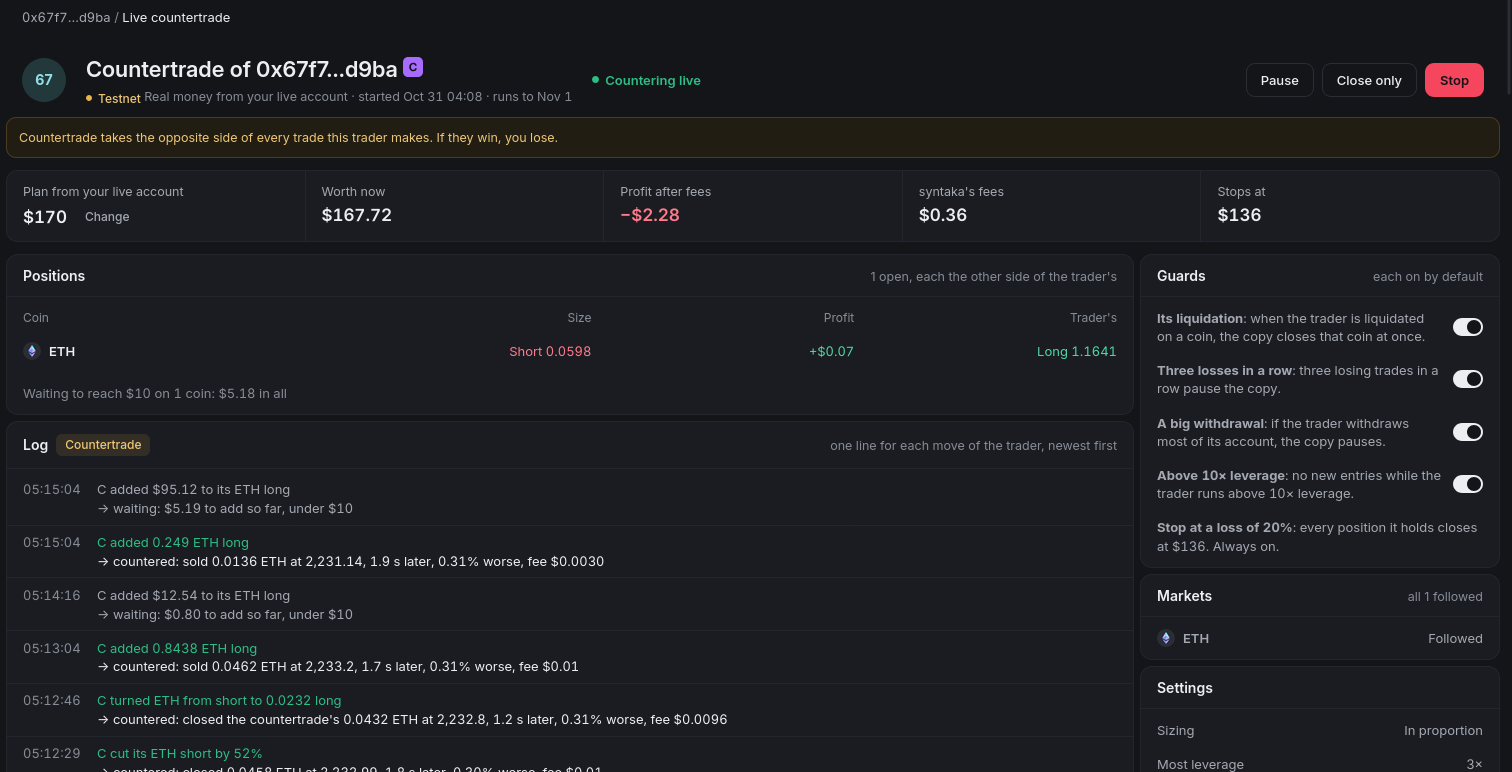
The summary, What this countertrade does, shows Side: The opposite of the trader's, what it holds at most, the most it can lose, and its risks.
Start it
Press Start the countertrade on paper to run it with practice money first. With live trading on, press Countertrade with real money instead. The confirmation names it, for example "Confirm: countertrade 0x67f7…d9ba with $1,000", and Start the live countertrade starts it.
Exits: the trader's stop is your take profit
syntaka follows the trader's positions, not the orders they leave resting on Hyperliquid. So the trader's exits work the other way round for you:
- When the trader's stop loss fills, the trader closes at a loss and your countertrade closes at a gain. It works as your take profit.
- When the trader's take profit fills, the trader closes at a gain and your countertrade closes at a loss. It works as your stop.
- Each of these closes is a market order sent moments after the trader's fill. It is not an order resting on Hyperliquid, so it can fill at a different price from the trader's.
- Your own stop at a loss is always on top of these. When the countertrade is down that much, every position it holds closes at market and it stops.
The guards
Every guard of a copy works the same way for a countertrade. Each one looks at the countertrade's own side and its own trades:
- Its liquidation: when the trader is liquidated on a coin, the countertrade closes that coin at once.
- Three losses in a row: three losing trades of the countertrade in a row pause it.
- A big withdrawal: if the trader takes out most of their account, the countertrade pauses.
- Above 10× leverage: no new entries while the trader runs above 10× leverage.
With real money, your caps, Stop (the kill switch) and syntaka's own limits apply as for every live order. See Live trading.
Its limits
- Never on syntaka's picks. syntaka picked those traders because they win, so the choice is greyed out on them: "Countertrade isn't offered on syntaka's picks: we picked this trader because they win." If syntaka makes a trader a pick after you started countering them, your countertrade runs on, and its log says so once: "syntaka now picks this trader. Your countertrade runs on; you can stop it."
- Not in For You. For You only copies. A trader you countertrade isn't marked You follow there.
- Never beside a copy of the same trader. A copy and a countertrade of one trader would only cancel each other out, and you would pay the fees twice. So you can't start one while the other runs, or while it is stopped but still holds positions. This includes a copy from For You. Stop the other one first, with its positions closed.
- Never against your own position. With real money, a countertrade adds nothing on a coin where you hold your own position the other way. It skips that add, says why in its log ("Close your own ETH position to countertrade ETH."), and runs on.
- Stock and commodity markets follow the same rules as a copy. See Stock and commodity markets.
Where you see it
A countertrade is marked as one everywhere a copy shows:
- On the trader's page, the button reads Countering.
- The countertrade's page says Countertrade of the trader, and Countering live or Countering on paper. Under the title it repeats what a countertrade does. Each position shows beside the Trader's, the log is marked Countertrade, and each move reads, for example, "C added 0.8438 ETH long → countered: sold 0.0462 ETH at 2,233.2".
- Portfolio marks it with a Countertrade badge, in the practice list of traders and in the live Copies and Fills.
- Its share card says Countertrade, and its post says "Countering" instead of "Copying".
- Live alerts say, for example, "Countered: … opened a ETH long", with your own side: "Yours: $800 short …, the opposite side."
Risks
If the trader wins, you lose
A trader who lost last month can win this month. Their gains are your losses, and their take profits close your countertrade at a loss. Read Risks before you start one.